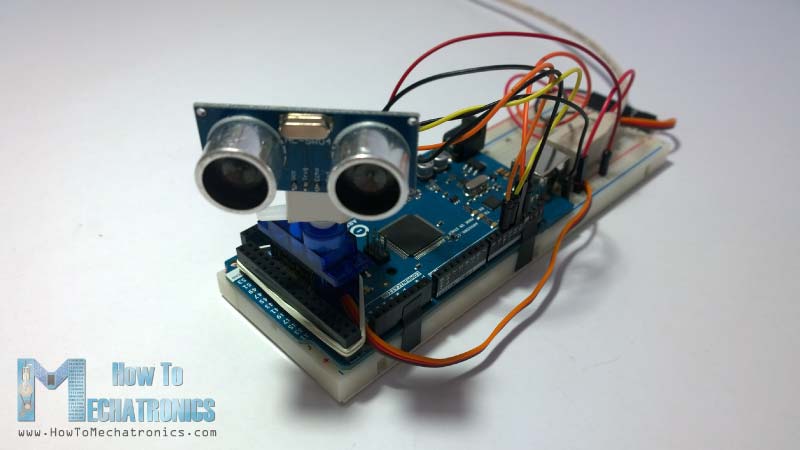
Real-time object detection and visualization system
A comprehensive radar system built with Arduino Uno, HC-SR04 ultrasonic sensor, and servo motor, featuring web-based visualization and data logging capabilities.
#include <Servo.h>
#include <NewPing.h>

#include

// Define connection pins
const int trigPin = 9;
const int echoPin = 10;
const int servoPin = 11;
const int buzzerPin = 12; // Buzzer pin

// Define variables
long duration;
int distance;
int angle = 0; // Start at 0 degrees
int step = 1; // Move 1 degree at a time
bool movingClockwise = true; // Direction flag

// Detection parameters
const int detectionThreshold = 30; // Distance in cm to trigger buzzer (adjust as needed)
bool objectDetected = false;

Servo radarServo; // Create servo object

void setup() {
  pinMode(trigPin, OUTPUT);
  pinMode(echoPin, INPUT);
  pinMode(buzzerPin, OUTPUT); // Set buzzer pin as output
  radarServo.attach(servoPin);
  Serial.begin(9600); // Start serial communication
}

void loop() {

  // Move the servo to the current angle
  radarServo.write(angle);

  // Get distance measurement from ultrasonic sensor
  distance = calculateDistance();

  // Check if object is detected within threshold
  if (distance > 0 && distance < detectionThreshold) {
    objectDetected = true;
    tone(buzzerPin, 1000); // Sound buzzer at 1000Hz
  } else {
    objectDetected = false;
    noTone(buzzerPin); // Turn off buzzer
  }

  // Send data to Processing in the format: "angle,distance"
  Serial.print(angle);
  Serial.print(",");
  Serial.println(distance);

  // Calculate the next angle
  if (movingClockwise) {
    angle += step; // Increase the angle
  } else {
    angle -= step; // Decrease the angle
  }

  // Change direction when we hit the limits (0 or 180)
  if (angle >= 180) {
    movingClockwise = false; // Now move counter-clockwise
    angle = 180; // Ensure it doesn't exceed 180
  }
  if (angle <= 0) {
    movingClockwise = true; // Now move clockwise
    angle = 0; // Ensure it doesn't go below 0
  }

  // Small delay for stability and to control sweep speed
  delay(30);
}

// Function to calculate distance
int calculateDistance() {
  digitalWrite(trigPin, LOW);
  delayMicroseconds(2);
  digitalWrite(trigPin, HIGH);
  delayMicroseconds(10);
  digitalWrite(trigPin, LOW);
  duration = pulseIn(echoPin, HIGH);
  distance = duration * 0.034 / 2;
  return distance;
}
JavaScript code for real-time radar visualization:
// Radar canvas animation
import processing.serial.*;

Serial myPort; // Serial object
int angle = 0;
int distance = 0;
int maxDistance = 200; // Maximum distance to display (in cm)
boolean objectDetected = false;

// Colors
color radarGreen = color(0, 255, 100);
color backgroundColor = color(10, 20, 30);
color gridColor = color(50, 100, 50, 100);
color textColor = color(220, 220, 220);
color warningColor = color(255, 50, 50);
color glowColor = color(0, 255, 100, 50);

// Radar sweep history
ArrayList distances = new ArrayList();
ArrayList angles = new ArrayList();
PFont font;

void setup() {
  size(800, 600, P2D); // Use P2D for smoother rendering
  smooth(8); // Higher anti-aliasing

  // Load a professional font
  font = createFont("Arial", 16, true);
  textFont(font);

  // List all available serial ports
  printArray(Serial.list());

  // Initialize serial communication - change the index to match your Arduino's port
  String portName = Serial.list()[2]; // Adjust as needed
  myPort = new Serial(this, portName, 9600);
  myPort.bufferUntil('\n'); // Read data until newline

  // Initialize distance history
  for (int i = 0; i < 360; i++) {
    distances.add(0);
    angles.add(i);
  }
}

void draw() {
  // Draw gradient background
  drawGradientBackground();
  drawRadar();
  drawGrid();
  drawObject();
  drawInfoPanel();

  // Flash warning if object detected
  if (objectDetected) {
    drawWarning();
  }
}

void drawGradientBackground() {
  for (int i = 0; i < height; i++) {
    float t = map(i, 0, height, 0, 1);
    stroke(lerpColor(color(10, 20, 30), color(20, 40, 60), t));
    line(0, i, width, i);
  }
}

void drawRadar() {
  pushMatrix();
  translate(width/2, height/2); // Move origin to center

  // Draw semi-circular radar background with gradient
  noFill();
  for (int i = 1; i <= 6; i++) {
    stroke(lerpColor(gridColor, color(0, 0, 0, 0), i/6.0));
    strokeWeight(1);
    arc(0, 0, i * 50, i * 50, PI, TWO_PI);
  }

  // Draw angle lines with subtle fade
  for (int i = 0; i <= 180; i += 15) { // Finer angle increments
    float x = cos(radians(i)) * maxDistance;
    float y = sin(radians(i)) * maxDistance;
    stroke(gridColor);
    strokeWeight(0.5);
    line(0, 0, x, -y);
    // Draw angle labels
    fill(textColor);
    textSize(12);
    textAlign(CENTER, CENTER);
    if (i % 30 == 0) { // Label only major angles
      text(i + "°", cos(radians(i)) * (maxDistance + 20), -sin(radians(i)) * (maxDistance + 20));
    }
  }

  // Draw distance circle labels
  for (int i = 1; i <= 4; i++) {
    int dist = i * 50;
    fill(textColor);
    textSize(12);
    textAlign(CENTER, CENTER);
    text(dist + "cm", 0, -dist - 10);
  }

  // Draw sweeping line with fade effect, moving forward and backward
  strokeWeight(3);
  float cycle = frameCount % 360; // Full cycle: 0° to 180° and back to 0°
  float sweepAngle;
  if (cycle < 180) {
    sweepAngle = map(cycle, 0, 180, 0, 180); // Forward sweep
  } else {
    sweepAngle = map(cycle, 180, 360, 180, 0); // Backward sweep
  }
  float endX = cos(radians(sweepAngle)) * maxDistance;
  float endY = sin(radians(sweepAngle)) * maxDistance;
  stroke(lerpColor(radarGreen, color(0, 0, 0, 0), 0.3));
  line(0, 0, endX, -endY);

  popMatrix();
}

void drawGrid() {
  // Draw subtle grid lines
  stroke(gridColor);
  strokeWeight(0.5);

  // Horizontal lines
  for (int i = 0; i < height; i += 40) {
    line(0, i, width, i);
  }

  // Vertical lines
  for (int i = 0; i < width; i += 40) {
    line(i, 0, i, height);
  }
}

void drawObject() {
  pushMatrix();
  translate(width/2, height/2);

  // Draw all detected points from history with glow
  for (int i = 0; i < angles.size(); i++) {
    int histAngle = angles.get(i);
    int histDistance = distances.get(i);

    if (histDistance > 0 && histDistance < maxDistance) {
      float x = cos(radians(histAngle)) * histDistance;
      float y = sin(radians(histAngle)) * histDistance;

      // Draw glow effect
      noStroke();
      fill(glowColor);
      float glowSize = map(histDistance, 0, maxDistance, 20, 10);
      ellipse(x, -y, glowSize, glowSize);

      // Draw point
      fill(radarGreen);
      float pointSize = map(histDistance, 0, maxDistance, 8, 4);
      ellipse(x, -y, pointSize, pointSize);
    }
  }

  // Draw most recent detection with enhanced highlight
  if (distance > 0 && distance < maxDistance) {
    float x = cos(radians(angle)) * distance;
    float y = sin(radians(angle)) * distance;

    // Glow effect for recent detection
    noStroke();
    fill(warningColor, 80);
    ellipse(x, -y, 20, 20);

    // Highlighted point
    fill(warningColor);
    ellipse(x, -y, 12, 12);

    // Draw distance line
    stroke(radarGreen, 150);
    strokeWeight(1);
    line(x, -y, x, height/2 - 40);

    // Draw distance text
    fill(textColor);
    textSize(14);
    textAlign(LEFT, CENTER);
    text(nf(distance, 1, 1) + " cm", x + 10, -y);
  }

  popMatrix();
}

void drawInfoPanel() {
  // Draw semi-transparent info panel with rounded corners
  fill(0, 0, 20, 200);
  noStroke();
  rect(20, height - 110, width - 40, 100, 15);

  // Draw text info
  fill(textColor);
  textSize(18);
  textAlign(LEFT, CENTER);
  text("Arduino Radar System", 40, height - 90);
  text("Angle: " + nf(angle, 1, 1) + "°", 40, height - 60);
  text("Distance: " + nf(distance, 1, 1) + " cm", 40, height - 30);

  textAlign(RIGHT, CENTER);
  text("Max Distance: " + maxDistance + " cm", width - 40, height - 90);
  text("Object Detected: " + (objectDetected ? "YES" : "NO"), width - 40, height - 60);

  if (objectDetected) {
    fill(warningColor);
    text("WARNING: OBJECT DETECTED!", width - 40, height - 30);
  }
}

void drawWarning() {
  // Subtle pulsing warning overlay
  float pulse = map(sin(millis() * 0.005), -1, 1, 20, 60);
  fill(warningColor, pulse);
  noStroke();
  rect(0, 0, width, height, 20);
}

void serialEvent(Serial myPort) {
  try {
    String data = myPort.readStringUntil('\n').trim();
    if (data != null) {
      String[] values = split(data, ',');
      if (values.length == 2) {
        angle = int(values[0]);
        distance = int(values[1]);

        // Update history
        distances.set(angle, distance);

        // Check if object is detected (within 30cm)
        objectDetected = (distance > 0 && distance < 30);
      }
    }
  } catch (Exception e) {
    println("Error reading serial data: " + e.getMessage());
  }
}

void keyPressed() {
  // Adjust max distance with up/down arrows
  if (keyCode == UP) {
    maxDistance += 10;
  } else if (keyCode == DOWN) {
    maxDistance = max(10, maxDistance - 10);
  }
}
| Time | Angle | Distance | Status |
|---|---|---|---|
| 15:30:04 | 156° | 45 cm | Close |
| 15:30:03 | 112° | 89 cm | Normal |
| 15:30:02 | 78° | 123 cm | Normal |
| 15:30:01 | 45° | 67 cm | Normal |
Continuous 150° sweep with live data visualization
Interactive radar display in browser with animations
CSV export for analysis and research
Configurable detection sensitivity and range
Buzzer alerts for close objects detection
Complete code and schematics available
Project Setup
Demo Video
Circuit Diagram
Performance Data

